
The click is the part of a keypad people notice without knowing why. A crisp snap reads as quality, a soft collapse reads as cheap, and no click at all reads as broken. That feeling comes almost entirely from one small component: the dome under each key.
This guide compares the four tactile options available in a membrane keypad — metal dome, poly dome, embossed overlay and no dome at all — and explains how to pick the one that matches the product, the user and the budget.
Why This Matters
The dome sets three things at once: how the key feels, how long it lasts and how much the keypad costs. It also affects stack thickness, noise and whether the keypad can be used with gloves.
It is also one of the easiest things to get wrong, because it is specified by feel. Two keypads can both be called "tactile" and behave very differently. A specification that only says "tactile" leaves the supplier to guess, and the result is usually a sample that is rejected for feel rather than for any defect.
Key Takeaways
- Four tactile options exist: no dome (flat), embossed overlay, poly dome and metal dome. Each trades cost against click quality and life.
- Metal domes give the crispest snap and generally the longest life. Poly domes give a softer click at lower cost. Embossing gives a subtle cue at the lowest cost.
- Specify feel with numbers: actuation force, travel and tactile ratio, not just the word "tactile".
- Dome type affects noise, stack height and glove usability, so decide it with the environment in mind.
- Always evaluate on a prototype, since overlay material and key size change how the same dome feels.
How a Dome Works
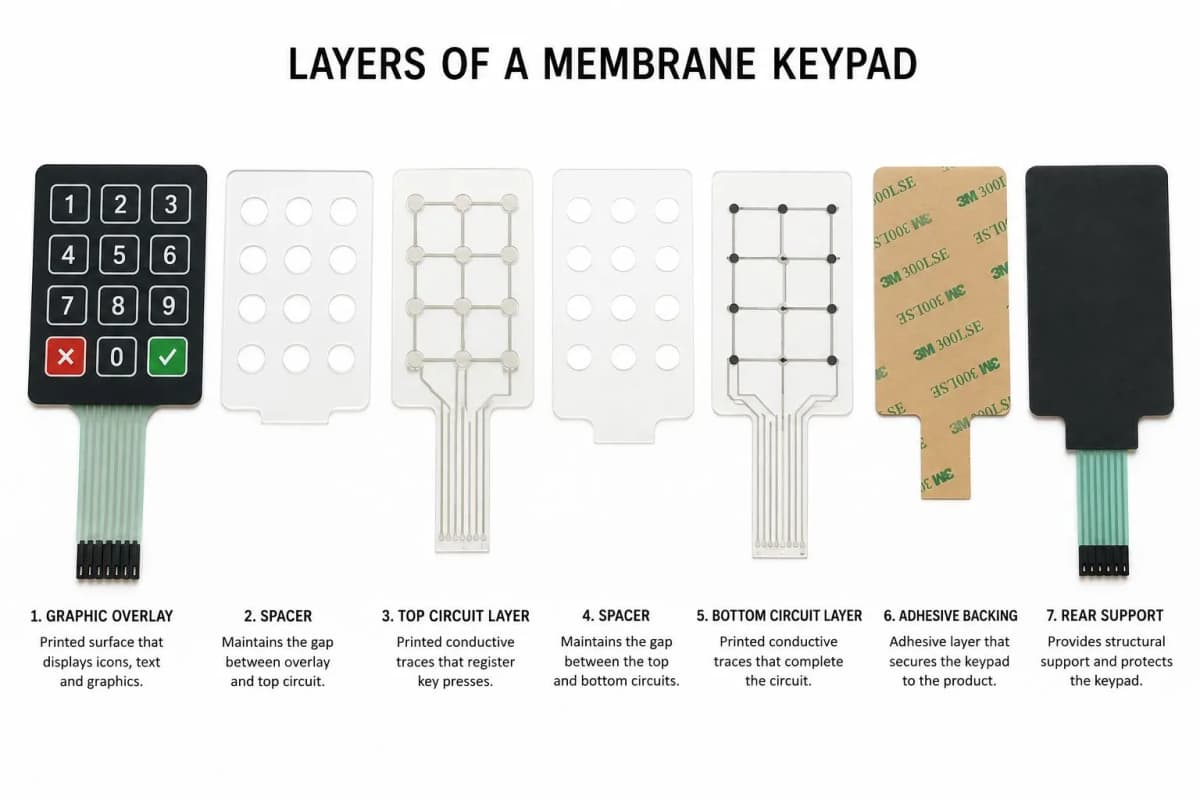
Each key sits over a small air gap between two circuit layers. A dome placed over the key holds the layers apart. When the user presses, force builds until the dome buckles, which gives the click. The dome then pushes the top circuit into contact with the bottom one. On release, the dome springs back and the contact opens.
The curve of force against travel is what the finger feels. Force rises to a peak, drops sharply as the dome collapses, then rises again as the contact closes. The size of that drop relative to the peak is the tactile ratio, and it is the best single number describing how "snappy" a key feels.
Option 1: No Dome (Flat Non-Tactile)
With no dome and no emboss, the overlay stays flat and the circuit layers simply meet. The user feels only a slight give.
Advantages: lowest cost, thinnest stack, silent, and the longest contact life because nothing fatigues.
Limitations: no mechanical confirmation, so feedback must come from a beep, an LED or a display. Hard to use with gloves or without looking.
Best for: sealed, display-led products such as laboratory instruments and appliances with an LCD.
Option 2: Embossed Overlay
The overlay itself is formed into a raised key. A pillow emboss raises the whole key, and a rim emboss raises only the edge. The key collapses slightly when pressed.
Advantages: low cost, quiet, no extra parts in the stack, and good key location by touch.
Limitations: the tactile cue is mild and depends strongly on overlay material and gauge. The emboss is usually the first area to fatigue. Our guide to polycarbonate vs polyester overlays explains how material changes emboss life.
Best for: cost-sensitive products where a gentle cue is enough.
Option 3: Poly Dome
A poly dome is a formed polyester dome with a conductive ink pad printed on its underside. It collapses with a soft click and returns the gap on release.
Advantages: clearer click than emboss alone, modest cost, quiet to moderate noise, and good design flexibility in size and force.
Limitations: lower life than metal domes, and a softer, less defined snap.
Best for: consumer products, security panels and light industrial controllers.
Option 4: Metal Dome
A metal dome is a thin stainless steel disc formed into a shallow dome. It snaps through with a sharp, defined click and snaps back. It is held in place by a retainer layer and usually makes the contact itself or presses on a printed pad.
Advantages: the most positive feel, the longest life of the tactile options, consistent force over time and strong performance with gloves.
Limitations: higher cost, audible click, added stack height and an extra assembly step for placing and retaining domes.
Best for: point-of-sale terminals, industrial controls, fuel dispensers, test equipment and any product where the keypad is a premium touchpoint.
Dome Types Compared
| Feature | No dome | Embossed | Poly dome | Metal dome |
|---|---|---|---|---|
| Tactile feedback | None | Soft, subtle | Moderate click | Crisp snap |
| Typical tactile ratio | None | Low | Moderate | Moderate to high |
| Relative cost | Lowest | Low | Low to moderate | Moderate to higher |
| Typical life | Highest | Lower | Moderate | High |
| Noise | Silent | Quiet | Quiet to moderate | Audible click |
| Stack height | Thinnest | Thin | Slightly thicker | Thicker |
| Glove use | Poor | Fair | Good | Best |
Specifying Feel: The Numbers That Matter
- Peak actuation force: the force at which the dome collapses. Too light causes accidental presses, too heavy tires the user.
- Contact force: the force at which the circuit closes, which should follow the peak closely.
- Tactile ratio: the drop after the peak, as a percentage of the peak. A moderate to high ratio gives a clear snap.
- Travel: how far the key moves. Short travel suits thin products; longer travel feels more deliberate.
- Life: the number of actuations required, and the test method used to rate it.
Specifying these values at the start turns a subjective argument about feel into a measurable drawing note.
What Changes How a Dome Feels
The same dome can feel different from one product to the next. The main causes are:
- Overlay material and gauge. A thicker or stiffer overlay damps the click.
- Key size and spacing. Small keys and tight spacing change how force is spread.
- Spacer thickness and air gap. These set the travel and contact timing.
- Backer stiffness. A flexible mounting surface softens the feel; a rigid backer sharpens it. See our guide to rigid backers and mounting options.
- Dome retention. Poor retention lets domes shift, which causes inconsistent feel between keys.
Manufacturing Insight: Approve feel on a sample built with the final overlay, adhesive and backer. A dome sample tested on a bare table feels very different from the finished stack, and that gap is a common source of late rejections.
Noise and Environment
Metal domes click audibly, which is a benefit for confirmation and a drawback in quiet settings such as medical rooms or libraries. Poly domes and embossed keys are quieter. Temperature also matters: cold stiffens overlays and changes feel, while heat can soften adhesives and affect dome retention. Match the dome to the real operating range, not only the room-temperature sample.
Typical Applications
- No dome: laboratory instruments, appliance panels, sealed devices with a display.
- Embossed: low-cost consumer devices and simple controllers.
- Poly dome: consumer electronics, security keypads and light industrial equipment.
- Metal dome: POS terminals, industrial controls, fuel dispensers and gloved-use equipment.
Common Mistakes
- Specifying "tactile" without numbers. The supplier cannot match a feel that has not been defined.
- Choosing metal domes by default. They are excellent, but a display-led, cost-sensitive product may not need them.
- Judging feel on a bare sample. Overlay, adhesive and backer all change the result.
- Ignoring the glove factor. A soft click disappears under a thick glove.
- Moving keys after layout is frozen. Dome behaviour depends on key size and position, so late changes force a re-tune.
Decision Framework
- Does the user look at the keypad when pressing? If not, choose a tactile option.
- Are gloves or no-look use involved? Choose metal domes.
- Is the product price sensitive with a modest feel requirement? Choose poly dome or emboss.
- Is a display giving all the feedback and cost is critical? Choose flat.
- Is the environment quiet? Prefer poly dome or emboss over metal.
- Define actuation force, tactile ratio, travel and life on the drawing, then validate on a prototype.
Frequently Asked Questions
What is the difference between a metal dome and a poly dome?
A metal dome is a thin stainless steel disc that snaps through with a crisp click and typically has the longest life. A poly dome is a formed polyester dome with a conductive pad printed underneath. It gives a softer click at lower cost and is common in consumer and light industrial products.
What is tactile ratio and why does it matter?
Tactile ratio compares how much the actuation force drops after the dome collapses against the peak force. A higher ratio gives a more distinct snap. Very low ratios feel mushy, and very high ratios can feel harsh or noisy.
How much actuation force should a membrane keypad have?
Most tactile keypads sit somewhere in the low hundreds of grams-force. Lighter forces suit frequent, light-touch input, while heavier forces reduce accidental presses and suit gloved or industrial use. Confirm the figure with prototypes.
Can I use domes on a flat keypad?
Yes. Domes sit beneath the overlay, so a flat-faced overlay can still feel tactile. Adding an emboss on top strengthens the cue and helps the user locate the key.
How many actuations does a metal dome last?
Metal domes are commonly rated in the millions of actuations, while poly domes and embossed overlays are generally rated lower. Real life depends on dome size, force, overlay material and test method, so ask for the rating on the exact design.
Which dome type is best for gloved use?
A metal dome with a clearly defined snap and a moderate to firm actuation force is usually the best choice. Adding an embossed key edge or a locator mark helps the user find the key without looking.
Conclusion
The dome is a small part that defines the character of a keypad. Metal domes deliver the best feel and life, poly domes balance cost and click, embossing gives a light cue for very little money, and flat keys win on simplicity. Define the feel with numbers, validate it on a finished stack, and choose the dome that matches the user and environment rather than the most premium option on the list.
If you are choosing a dome for a product, talk to our engineering team and we will help you match force, feel and life to your use case.