
Most membrane keypad problems are not manufacturing problems. They are specification problems — a flat keypad chosen for a product that operators use with gloves, or a metal dome keypad specified where a simple embossed overlay would have done the job for half the cost. The word "membrane keypad" covers a wide family of constructions, and the differences between them decide how the product feels, how long it lasts and what it costs.
This guide maps the full range of membrane keypad types, explains what separates them, and gives a framework for choosing. It is written for OEM design engineers, product managers and buyers who need to specify a keypad without already knowing the manufacturing vocabulary.
Why This Matters
A keypad is the part of a product that the user touches every single time they use it. It shapes the perception of quality more than almost any other component, and it is also one of the first parts to wear out in the field. Choosing the wrong type shows up as returns, complaints about "mushy" buttons, or a redesign when a certification or environmental requirement was missed.
The good news is that the decision space is small. Almost every membrane keypad is defined by four independent choices: how it feels (tactile type), how it is built (construction), how it is lit (backlit or not) and how it connects (tail and connector). Get those four right and the rest is detail.
Key Takeaways
- Membrane keypads are defined by four choices: tactile type, construction, lighting and connection. Treat them as separate decisions.
- Non-tactile (flat) keypads are the simplest, cheapest and longest-lived, but give no mechanical click.
- Embossed, poly dome and metal dome keypads add tactile feedback in rising order of cost and crispness.
- Backlighting is an add-on, not a type. Any keypad can be built with LEDs, light guide film, EL or no lighting at all.
- Rigid backers, shielding and sealed edges are added for stiffness, EMI/ESD protection and ingress protection, not for feel.
What a Membrane Keypad Actually Is
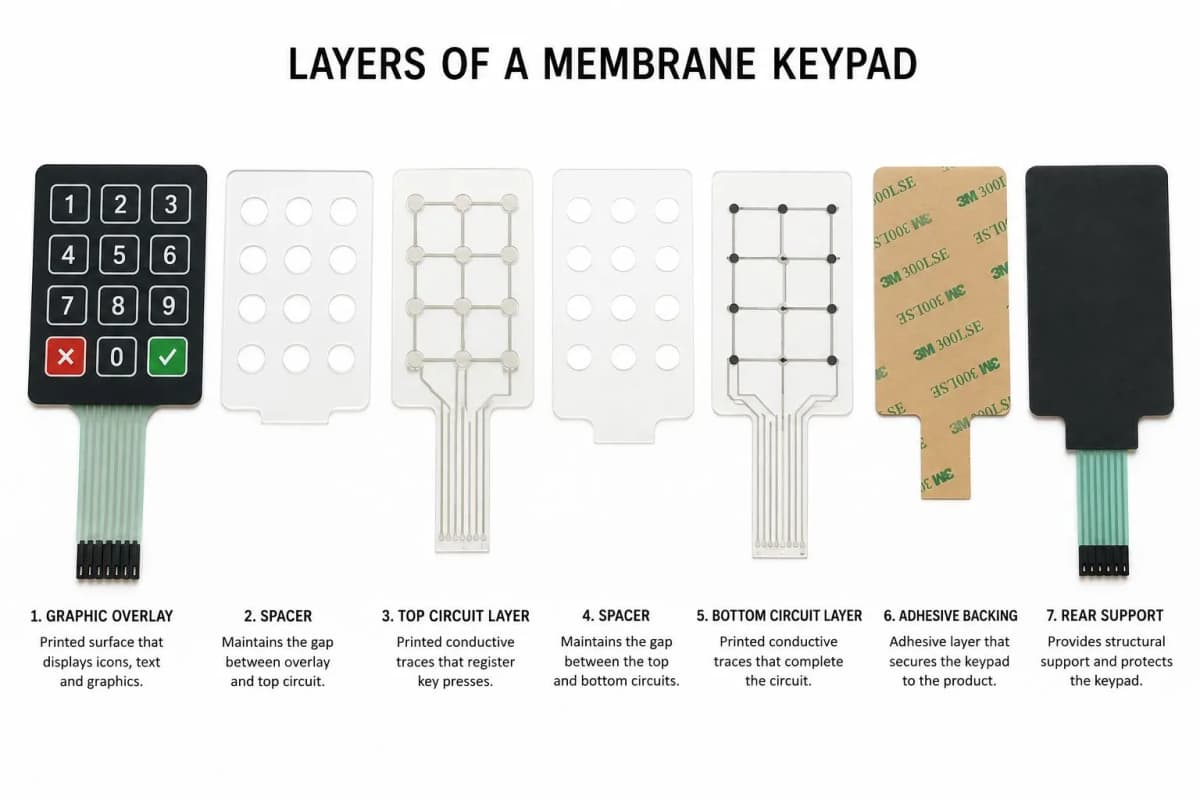
A membrane keypad is a thin, layered switch assembly. A printed graphic overlay sits on top. Below it is a spacer layer that holds two printed circuit layers apart by a small air gap. When a user presses a key, the top circuit flexes down and touches the bottom circuit, closing the contact. Release the key and the layers spring apart again.
In a typical build the stack is, from top to bottom:
- Graphic overlay (printed polyester or polycarbonate, often embossed)
- Adhesive layer
- Top circuit layer (conductive ink printed on polyester)
- Spacer layer with adhesive on both sides, die-cut at each key
- Optional dome layer (metal or poly domes) positioned over each key
- Bottom circuit layer
- Rear mounting adhesive and release liner
- A flexible tail that routes the signals out to a connector
Every type in this guide is a variation on that stack. For deeper construction detail, see our Membrane Keypad Design Guide.
Classification by Tactile Feel
Non-Tactile (Flat) Keypads
A flat keypad has no emboss and no dome. The overlay stays flat and the circuit layers meet when pressed. The user feels only a slight give. Confirmation has to come from somewhere else: a beep, an LED, a display change or a relay clicking.
Flat keypads are the simplest construction, with the fewest parts and the longest life, because there is no fatiguing dome or embossed rim. They suit sealed, wipe-clean equipment where the user is watching a display, such as lab instruments, appliances with an LCD, and many medical and food-service devices.
Embossed Tactile Keypads
Here the overlay itself is formed into a raised key shape, either a pillow emboss (the whole key is domed) or a rim emboss (only the edge is raised). The key collapses slightly when pressed and gives a mild tactile cue, with no separate dome in the stack.
Embossed keypads are inexpensive and give a soft, quiet feel. The trade-off is that the tactile cue is subtle and depends heavily on overlay material and thickness. The emboss is also the first area to fatigue over time, which is why material choice matters; see our guide to polycarbonate vs polyester overlays.
Poly Dome Keypads
A poly dome is a small formed polyester dome with a conductive ink pad printed on its underside, positioned over each key. It collapses with a soft click and restores the circuit gap on release. Poly domes give a clearer click than emboss alone, at modest cost, and are common in consumer and light industrial products.
Metal Dome Keypads
A metal dome is a thin stainless steel disc formed into a shallow dome. When pressed it snaps through with a crisp, defined click, then snaps back. This is the most positive tactile feel available in a membrane assembly and the one most associated with "premium" keypads. Metal domes are held in place by a dome retainer layer and generally deliver the longest life of the tactile options.
The full comparison of dome types, including actuation force and life, is covered in our dome types and actuation force guide.
| Feature | Flat (non-tactile) | Embossed | Poly dome | Metal dome |
|---|---|---|---|---|
| Tactile feedback | None | Soft, subtle | Moderate click | Crisp snap |
| Relative cost | Lowest | Low | Low to moderate | Moderate to higher |
| Typical life | Highest | Lower | Moderate | High |
| Noise | Silent | Quiet | Quiet to moderate | Audible click |
| Best for | Display-led, sealed UIs | Cost-sensitive products | General consumer and industrial | Premium, gloved or no-look use |
Classification by Construction
Flex-Only (Polyester Circuit) Keypads
The most common construction. Both circuit layers are printed on polyester film and the whole assembly is thin and flexible. It bonds directly to a panel, enclosure or rigid backer and exits through an integrated flexible tail. This is the default choice for most products.
Rigid-Backed Keypads
An aluminum, FR4 or polycarbonate backer is laminated behind the keypad. This adds stiffness, gives a flat mounting surface and helps keep key feel consistent, especially for larger keypads. It also lets the keypad be mounted by screws or standoffs rather than only by adhesive.
PCB- and FPC-Integrated Keypads
For keypads with LEDs, connectors and components, the circuit is built on a printed circuit board (rigid) or flexible printed circuit (copper on polyimide) instead of printed silver ink. This supports surface-mounted LEDs, fine-pitch traces, components such as resistors and drivers, and more complex routing. It costs more than a flex-only build and is the standard route for backlit and component-heavy designs.
Classification by Lighting
Lighting is not a keypad type in itself; it is an option applied to any of the above.
- Unlit: No lighting at all. Lowest cost and simplest. Suitable wherever the product is used in good ambient light.
- Indicator LEDs only: One or a few discrete LEDs show status (power, fault, mode). The keys themselves are not lit.
- Backlit keys or legends: LEDs, light guide film or EL panels light the key legends from behind so they are readable in the dark.
The details and trade-offs are covered in our guides on keypads with LEDs vs without LEDs and backlighting options.
Special Features That Change the Type
| Feature | What it adds | When to use it |
|---|---|---|
| Clear display window | Opening or clear area for an LCD, OLED or LED display | Any keypad that sits over a display |
| Embossed Braille or tactile locator | Raised marks on key edges or a home key | Accessibility, no-look operation |
| EMI/ESD shield layer | Grounded conductive layer inside the stack | Electrically noisy or ESD-prone environments |
| Textured or hardcoated overlay | Scratch and chemical resistance | Industrial and high-touch use |
| Sealed perimeter and venting | Ingress protection | Washdown, outdoor or dusty environments |
Typical Applications by Type
- Flat, unlit: Laboratory instruments, appliance control panels, sealed medical devices with a display.
- Embossed or poly dome: Consumer electronics, security panels, small industrial controllers.
- Metal dome: Point-of-sale terminals, industrial controllers used with gloves, fuel dispensers, test and measurement equipment.
- Backlit, PCB-integrated: Automotive and aerospace panels, night-use equipment, premium consumer devices.
Common Mistakes When Choosing a Type
- Specifying metal domes by default. They are excellent, but if the user is watching a display and the product is price sensitive, a flat or embossed keypad may be the right call.
- Ignoring the glove factor. Flat keypads are hard to use with thick gloves, since there is no click to confirm a press.
- Choosing a type before the environment. Chemical exposure, UV and washdown decide material and sealing, which in turn limit the tactile options.
- Adding backlighting late. Retrofitting LEDs after the layout is frozen forces compromises in layer order, thickness and tail routing.
- Forgetting the tail. The connector and tail routing often drive the PCB or enclosure design and should be settled early; see our guide to tail and connector types.
Manufacturing Insight: Settle the actuation force and tactile ratio target before the key layout is finalised. Key size and spacing affect how a dome or emboss behaves, and moving a key after tooling has been made is far more expensive than changing it on a drawing.
Decision Framework
Work through these questions in order:
- Will the user look at the keypad when pressing? If not, choose a tactile type.
- Gloves or no-look operation in play? Choose metal dome for the most positive click, or poly dome as a lower-cost alternative.
- Is cost the dominant constraint and the user watching a display? Choose flat or embossed.
- Used in the dark? Add backlighting, which in most cases pushes the build to FPC or PCB-integrated.
- Wet, dusty or outdoor? Specify polyester overlay, a sealed perimeter and a vent path.
- Electrically noisy or ESD exposed? Add a shield layer with a ground path through the tail.
Frequently Asked Questions
What are the main types of membrane keypads?
Membrane keypads are usually grouped by feel and by construction. By feel: non-tactile (flat), embossed tactile, poly dome tactile, and metal dome tactile. By construction: flex-only (polyester circuits), rigid-backed, and PCB- or FPC-integrated assemblies. Features such as LED backlighting, indicator windows and EMI shielding are layered on top of any of these.
What is the difference between a tactile and a non-tactile membrane keypad?
A tactile keypad gives the user a physical click or snap when a key is pressed, produced by an embossed overlay, a poly dome or a metal dome. A non-tactile keypad is flat and gives no mechanical feedback, so it relies on a beep, an LED or a display change to confirm the press.
Do membrane keypads need domes?
No. A flat membrane keypad without domes is simpler, cheaper and has the longest contact life, but the user gets no mechanical click. Domes are added when tactile confirmation matters, for example with gloved hands, in noisy environments or where the user cannot look at the keypad.
Can a membrane keypad be backlit?
Yes. Common methods are surface-mounted LEDs, light guide film with side-firing LEDs, and electroluminescent (EL) panels. A keypad can also be built with no lighting at all, or with only discrete LED indicators for status.
How long does a membrane keypad last?
Life depends on the construction. Flat non-tactile keypads generally rate the highest, metal dome keypads commonly rate in the millions of actuations, and poly dome and embossed designs are typically lower. Exact figures depend on actuation force, overlay material and gauge, and should be confirmed against the specific design.
Which membrane keypad type is cheapest?
A flat non-tactile keypad with no backlighting is usually the lowest-cost construction. Cost rises with domes, backlighting, rigid backers, shielding layers and more complex tails or connectors.
Conclusion
Membrane keypads are not one product but a family of constructions, and the right one is rarely the most elaborate. Decide first how the user needs to feel the press, then how the keypad is built, lit and connected, and keep each decision separate. Starting from the use environment rather than from a favoured construction avoids most of the costly changes that appear late in a program.
If you have a keypad to specify and want a second opinion on the type, you can contact our engineering team with your use case and we will recommend a construction.